
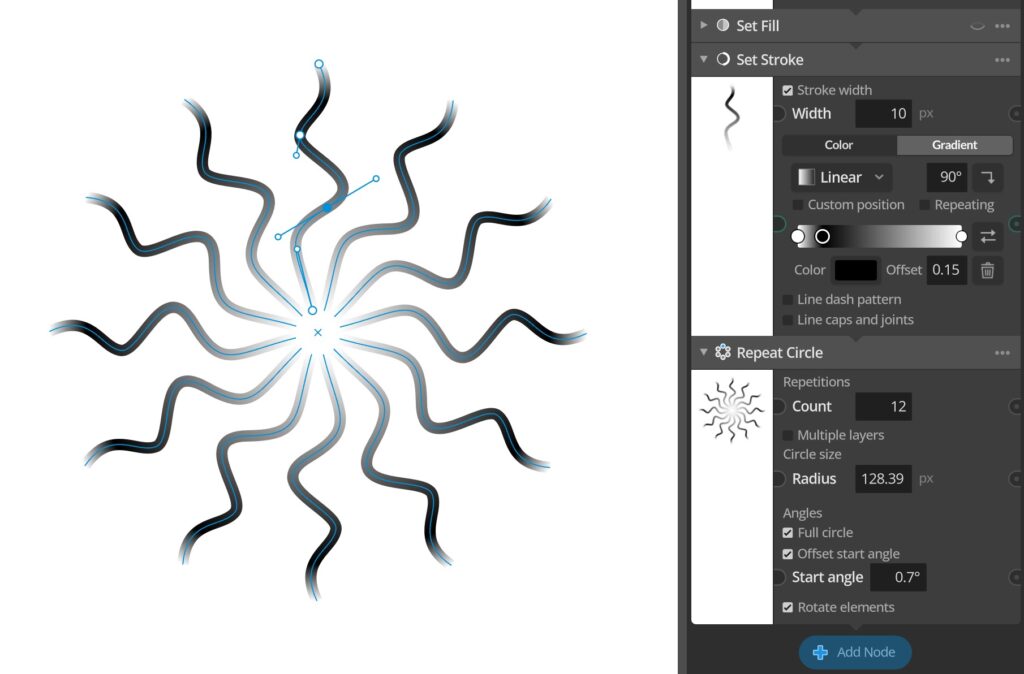
This update adds a couple of new gradient related improvements. Primarily the new feature that gradients can now also be used for stroke lines and not just fill color on path elements. To make it a little faster to work with gradients there is now also a new gradient presets option available in the right-click context menu on gradient controls where you can quickly change the gradient to one of a couple of presets.
Full update change log:
Changes and improvements
– Added support for applying color gradients to stroke lines.
– Added gradient presets available via the context menu on color gradient parameters.
– Added copy and paste context menu items to all color wells, making it easier to reuse color between for example gradient stops.
– Some UI adjustments to make things more compact.
Bug fixes
– Fixed gradient editing view new stop marker being left visible sometimes after mouse cursor left view.
You can check for updates and download the latest version from within Paragraphic if you have it installed, or you download it from paragraphic.design