
This new feature update of Paragraphic is themed around improving drawing tools in general, with a new dynamic snapping system and working with paths in particular with new features for working with path symmetry and offset. In addition to these and other new features the update also brings some big changes under the hood for more robust generation and future development, along with fixing a lot of issues large and small.
Below you can get a check out a quick overview video about the new features, and then you can read more about the changes in detail below, including the full change list at the bottom.
Snapping system
The first and likely most noticeable new feature is a new snapping system that allows you to snap horizontally and/or vertically to different things when working in the main view. For example, you can snap to layer edges when drawing shapes, moving layers or working with free form path control points.
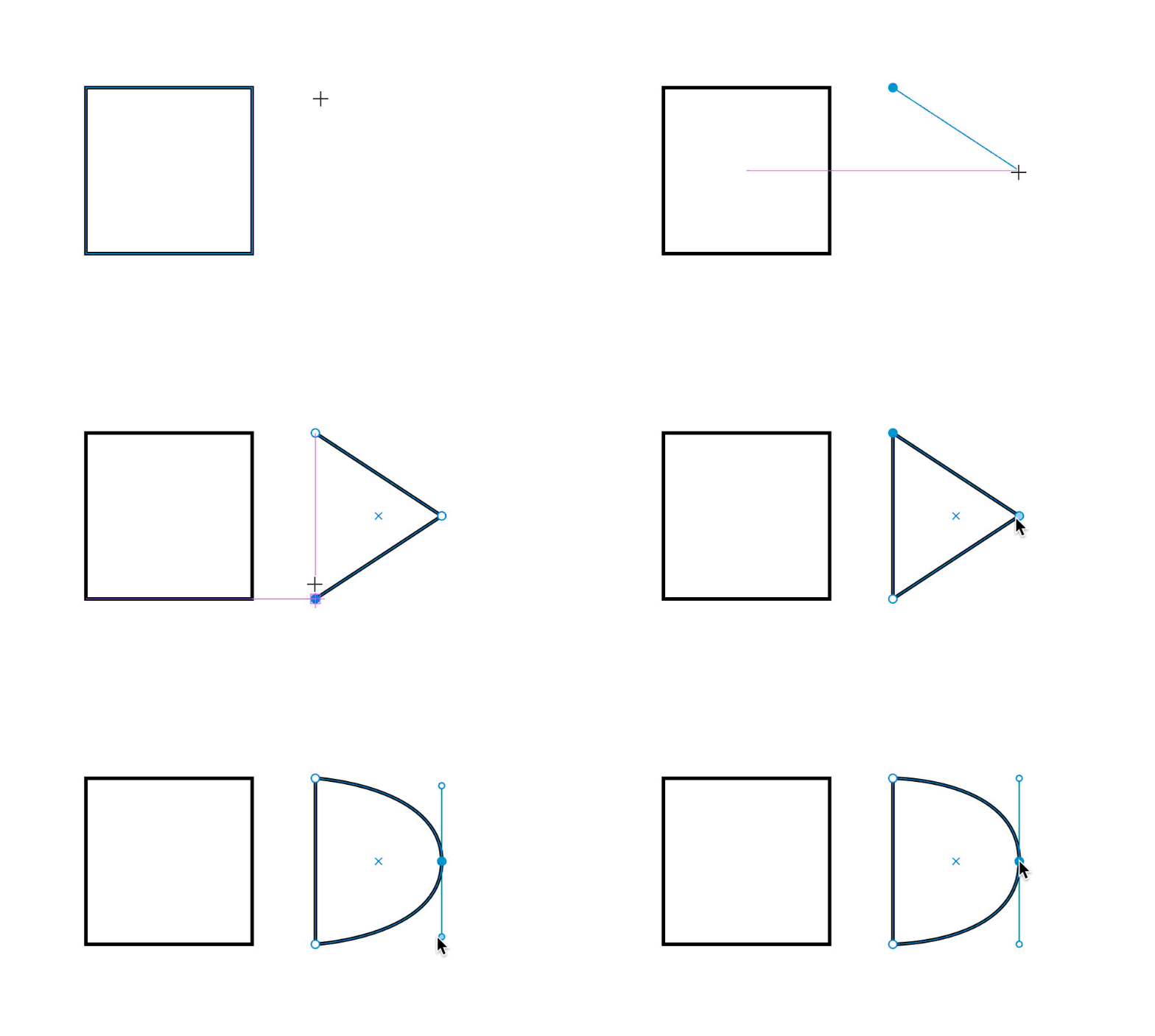
This makes it a lot easier to line things up and construct shapes without using the align-tools and will hopefully be a big UX improvement to most tools. The new snapping system can be toggled on/off in the bottom right and you can configure what to snap to in more detail.
As an added bonus there’s also a grid snap option and a new related option in the overlay display options to show this grid.
Measure tool
Pairing well with the new snapping system is the new Measure tool. This allows you quickly inspect visually if things are lined up and to inspect positions and well as measure distances between points.
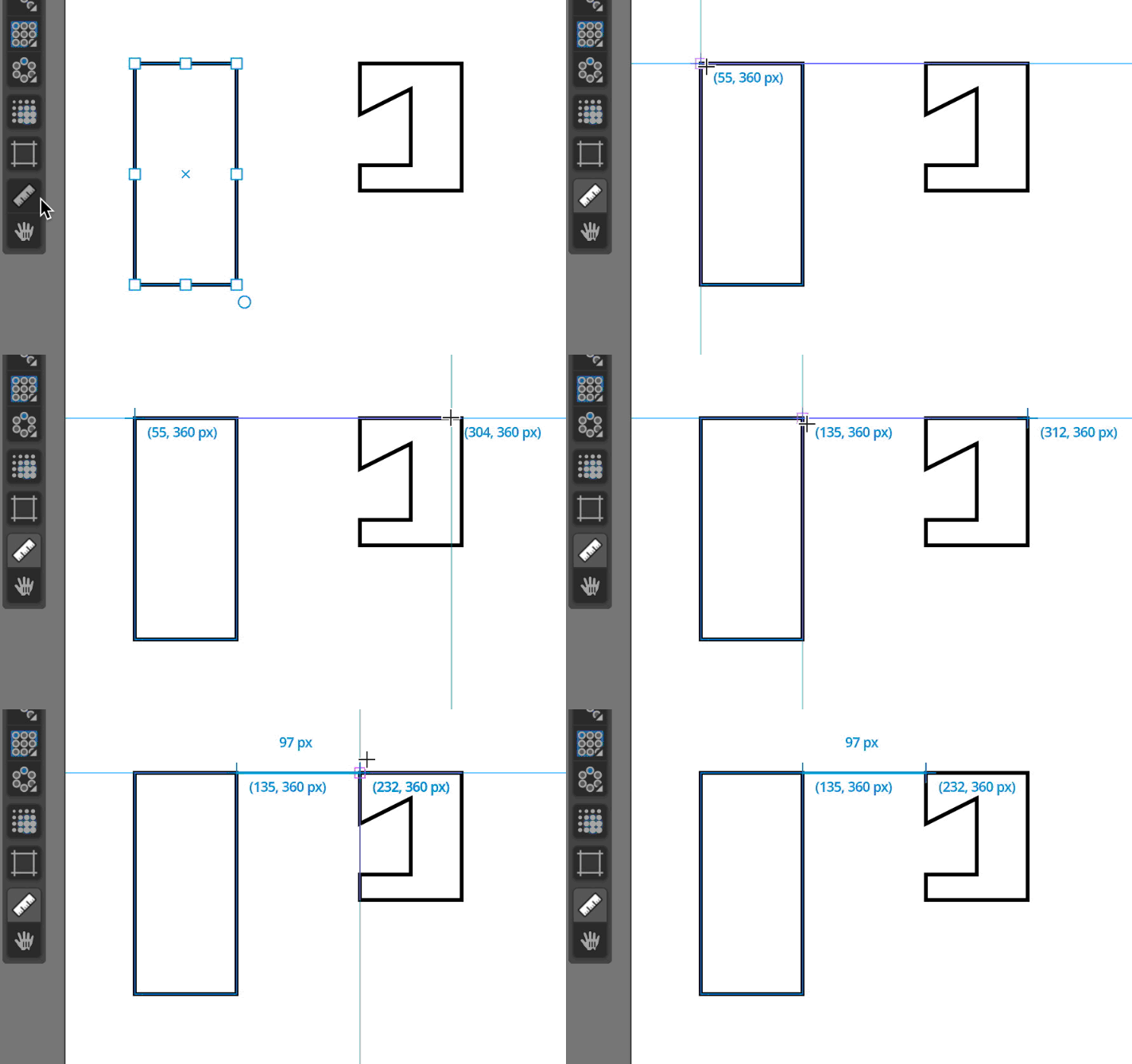
As the tool allows you to see position coordinates and sizes part of the motivation behind the tool is also to offer the user a way to better understand how positioning and sizes work in layer and nodes.
Path symmetry tools
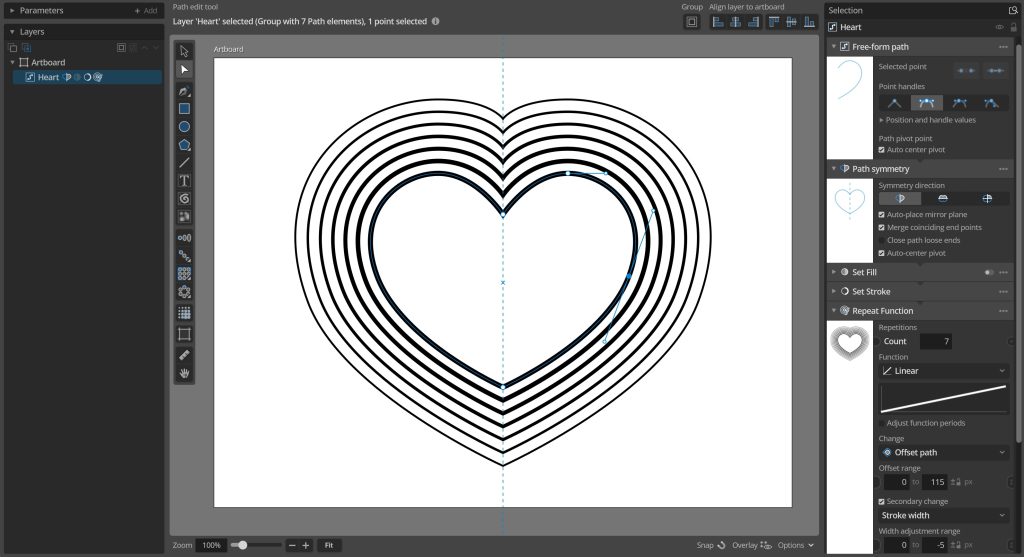
Beside the snapping system there’s another new feature to improve free form path drawing in the form of path symmetry. The new Path Symmetry node lets you set up a horizontal and/or vertical symmetry plane and then it adds mirrored copies of any path control points, optionally merging point on the symmetry lines and closing the shapes. So you’ll end up with a single symmetrical path. So now you can finally draw hearts with ease!
To access this you can just add the new Change / Path Symmetry node to a free form path layer, or you can use the new Free form path with symmetry tool to add a new path layer with a Path symmetry node added from the start.
Path offsetting
Another path-related new functionality is the addition of path offsetting functionality allowing you to grow or shrink a vector path with a set offset. This uses a simple method of offsetting that just moves the path control points outward/inward and scales the spline handles, which means that it will not be able to get good offset results for very sharp corners or intersecting geometry. But for simple shapes it should work decently.
You can apply path offsetting using the new Change Path Offset node, or as new Path offset options in the Apply Function, Repeat function and many other similar nodes that apply changes to elements.
Mirror repeater
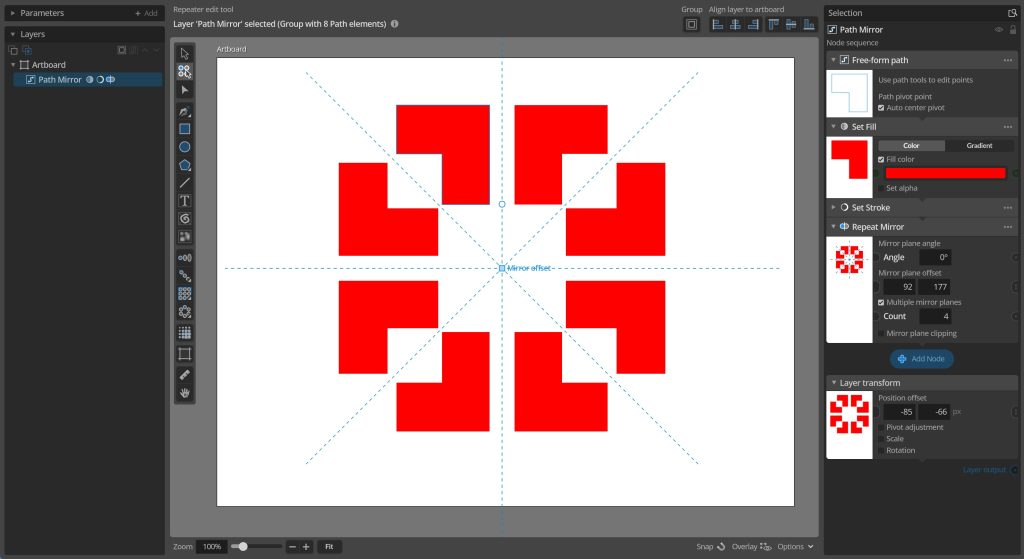
Finally, a new Mirror repeater node has been added that lets you repeat elements kaleidoscope-style by mirroring them using customizable mirror planes, optionally also clipping the elements using these mirror planes.
New generation system
The update also has quite extensive changes under the hood, with a large portion of the core generation system rewritten. While this hasn’t in itself added any new functionality it will hopefully be a much more robust system for future development, and these changes have also led to fixing a lot of bugs large and small (see the full list below). Hopefully without introducing too many new ones.
Full change list
Finally, below you can find the full list of all changes and fixes in the new version
Changes and improvements
– New snapping system. Dynamically snap layers and path points to line up with other points, edges or a fixed grid.
– New path symmetry features. Create symmetrical closed path shapes using the new Freeform path with symmetry tool or the path symmetry node.
– New path offset features. Features for growing/shrinking basic vector paths have been added in the new Offset Path change node as well as options in the Repeat Function, Randomize and Apply Function/Layer/Table nodes.
– New Mirror repeater node. Creating mirrored symmetry repetitions with configurable mirror plane(s) and optional clipping.
– New Measure tool. Inspect layer positions and relative distances, to make it easier to understand offsets and structure designs.
– Improved generation system for more robust multi-threading.
– You can now double-click selected layers to cycle between selection tools as an alternative to using middle-mouse button or tab.
– Added new option in instance layers (default enabled in new instance layers) to use the original group pivot when picking single elements from group, to avoid layers offset changing based on varying pivots in group elements.
– Improved undo action names to provide more context to what was changed.
– Improvements to automatic selection tool switching when editing node parameters.
– Improved feedback after trying to enter an invalid license code.
– Only draw custom node overlays in the main view for enabled layer nodes.
– Added display of layer pivot point while drawing freeform paths.
– Godot engine update to 4.6.2.
Bug fixes
– Fixes some issues with adding and removing image data connections that change between data types.
– Fixes some interference with window management system extension Magnet.
– Fixes imported SVG root group elements not being assigned correct element indexes.
– Fixes imports of SVGs with offset viewbox origins.
– Fixes control point UI not updating when selected control point is removed in undo/redo operation.
– Fixes color picker, font picker and other utility panels always opening on the main screen even if the main window was on a secondary screen.
– Fixed crash on using the windows undo menu item with the mouse in some situations.
– Fixed repeater handle origins when repeating elements with varying pivot and initial positions.
– Fixed star shape tool inner corner smoothing value being applied even if smoothing was disabled.
– Fixed undo grouping warning when moving artboards.
– Fixed warnings about getting reset values from parameters without them when adding/saving some document parameters.
– Fixed not being able to undo/redo data table first row headings changes.
– Fixed not being able to undo/redo data table length value unit changes.
– Fixed undo of loading data table CSV file not correctly restoring data table file path.
– Fixed Loop repeater generating an empty group element instead of no element with count set to zero, inconsistent with other repeaters
– Fixed tool fill and stroke settings not updating correctly to no fill / stroke when selecting layers with a disabled fill or stroke nodes.
– Fixed transform nodes automatically added when using repeater tools on transformed layers using wrong transform order for layers with both rotation and non-uniform scaling.
– Fixed initial incorrect line previews when drawing freeform paths in transformed layers.
– Fixed pen tool control point insertion location in transformed freeform path layers.
– Fixed issues with deleting an artboard that was set to be the tiled repeated artboard in display settings.
– Fixed image data parameter views incorrectly hiding the parameter menu button in the header sometimes.
– Fixed incorrect tooltip descriptions on freeform path open/close buttons.
– Fixed layer transform preview issues when last layer node preview had custom overlay elements.
– Fixed font character path generation adding duplicate control points for some fonts.
– Fixed main view mouse input being disabled while view zoom value field was active.
– Fixed not being able to deselect active artboard name edit fields in main view by clicking outside of them.
– Fixed font character path generation getting an invalid offset of the first control point in some unusual special cases.
– Fixed save/load resulting in incorrectly opened paths for some freeform path configurations.
– Fixed layer click selection sometimes selecting artboard instead right after deleting another layer.
You can check for updates and download the latest version from within Paragraphic if you have it installed, or you download it from paragraphic.design