
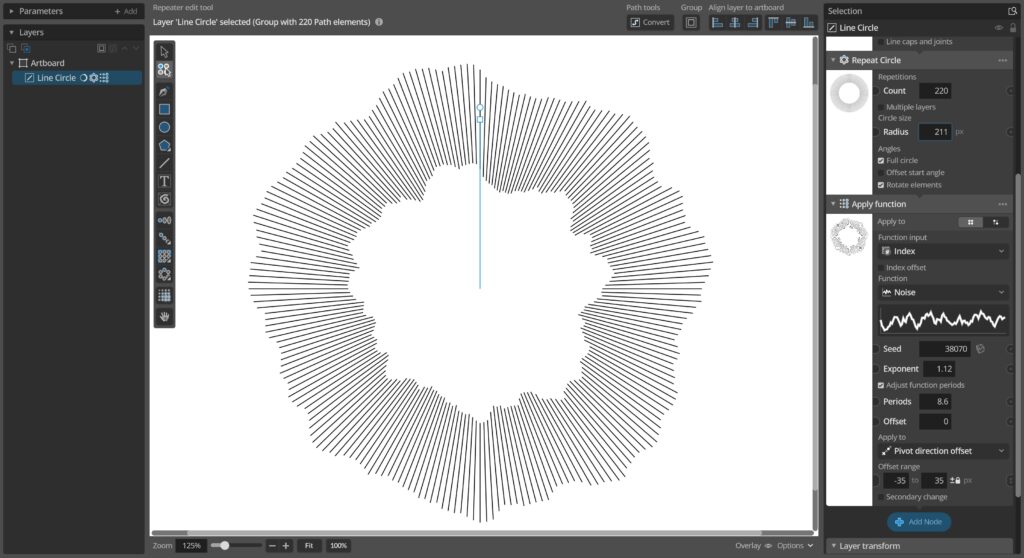
This update adds new ways of transforming elements in groups relative to the group pivot point, either moving them towards/away from the pivot or rotating them around it. These new transforms can be used via the new Group Pivot relative transform node, or as an option in the Apply Function, Randomize etc. nodes.
In addition to this the update also adds a new way to insert parameter input nodes before existing input nodes and fixes a couple of bugs.
Changes and improvements
– Added new Group Pivot Relative Transform node that allows you to offset and rotate individual elements in groups relative to the group pivot point.
– Added Pivot direction offset and Pivot rotation options to the different Apply/Randomize group nodes to allow offsetting and rotating elements relative to the group pivot point in them as well.
– You can now insert new parameter input nodes after an existing input node via a new “Insert node after” item in the input node menu. This allows you to insert further processing of input values without needing to remove and re-add existing nodes.
– Improvements to automatic numbering of copied/cut layers when pasted in.
– Improved generation index selection warning for nodes acting on single elements.
Bug fixes
– Fixed some issues trying to open parameter context menu for parameters without input sockets.
– Fixed hover controls stepping buttons not working for random seed parameters with large values.
– Removed some incorrect log error messages when undoing/redoing deleting input nodes.
– Fixed some issues with node interfaces not updating correctly on change between group and single element inputs.
You can check for updates and download the latest version from within Paragraphic if you have it installed, or you download it from paragraphic.design